 Apple Mac Operating System Versions

From Apple's System 1.0 to modern macOS: a chronological timeline of major releases for Macintosh and Mac. Created by & included on https://swissmacuser.ch/apple-mac-os-versions/

40

September 14, 2026

macOS 27 «Golden Gate»

macOS

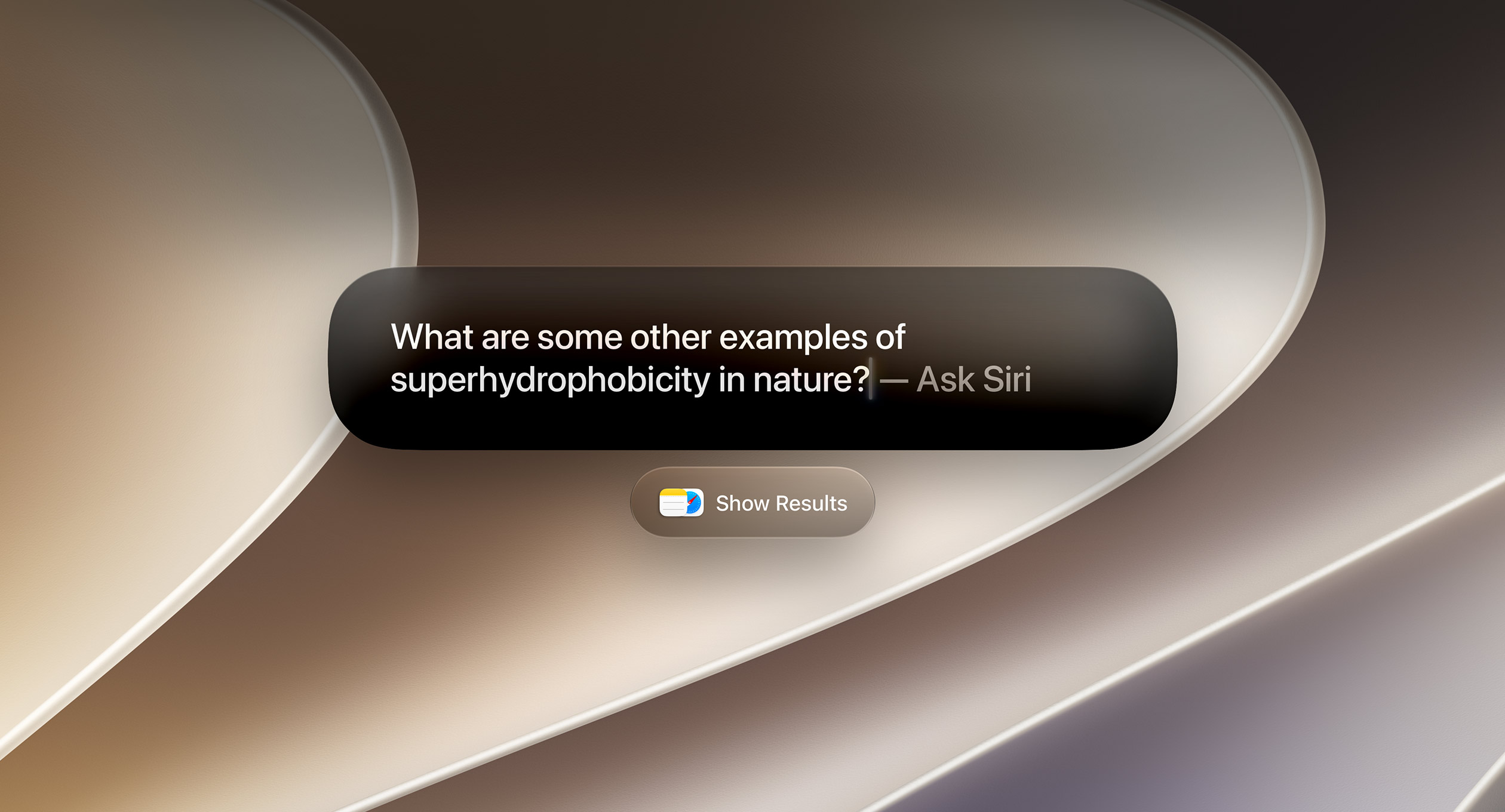
The biggest change in macOS «Golden Gate» is clearly Siri AI. Golden Gate is less about adding conventional Mac features and more about turning Apple Intelligence into an operating-system-level interaction layer: Spotlight → Siri → what's on your screen → actions inside your apps. Apple is promising faster AirDrop transfers, faster network file browsing and faster Safari start-page loading. Further it adds higher-resolution ultrawide-display support, including 5K at 120Hz, while preserving display arrangements when reconnecting displays.

  • Siri AI becomes a real Mac assistant
  • Visual Intelligence for your screen
  • Apple Intelligence gets substantially deeper
  • Liquid Glass gets refined
  • Safari becomes more proactive
  • Passwords can be fixed automatically

Image source: https://www.apple.com/os/macos/
39

June 8, 2026

macOS 27 «Golden Gate» Beta

macOS – Beta

In Golden Gate, Apple removed support for the Apple Filing Protocol (AFP), impacting backups to the AirPort TimeCapsule router, and no longer ships the Boot Camp App for installing Windows on Macs, due to the fully dropped Intel chips support. It‘s now the last macOS version to offer backwards-compatibility for Intel—optimized Apps through Rosetta 2.

The new features are mostly focused on harmonising the look+feel of the «Liquid Glass» UI, and gradual improvements across various Apple Apps, OS behaviour and performance (e.g. performance boost in «Low power mode»), a revamped Siri with Apple Intelligence, and a Big Mac gaming performance and compatibility boost through an updated Game Porting Toolkit (GPTK 4).

38

September 15, 2025

macOS 26.0 «Tahoe»

macOS

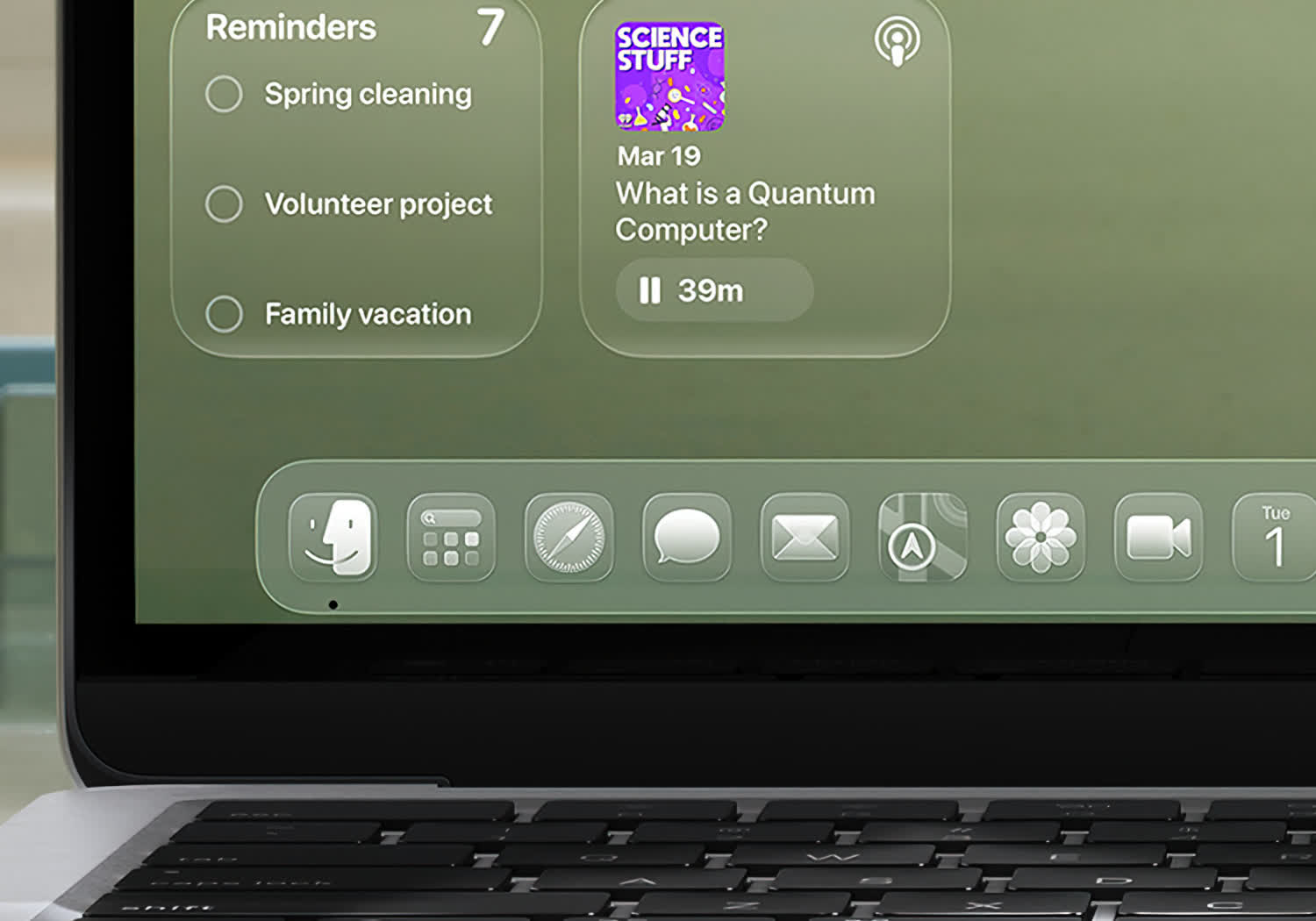
Tahoe brings a major UI redesign and productivity boost, combining a refreshed «Liquid Glass» look with deeper iPhone integration, enhanced Spotlight, and Apple Intelligence. It also expands gaming support, accessibility, and marks the transition away from Intel Macs.

  • Liquid Glass design
  • Spotlight with actions
  • More Apple Intelligence features
  • Better iPhone integrations on Mac
  • Customizable Finder folders
  • New Games app, Game Overlay, Metal 4 graphics improvements
  • Accessibility features
37

June 9, 2025

macOS 26.0 «Tahoe» Beta

macOS – Beta

Tahoe is the last version of macOS to be operable on Intel-based Macs. Apple also changed the version numbering of all their OS, including macOS, to reflect the year the OS is becoming the most recent public release (26 = 2026).

The release includes again a number of new features and improvements, but the main novelty is the new unified «Liquid Glass» UI which also brings a revamped user experience across all Apple devices.

Introduced across all Apple OS, including macOS Tahoe – the Liquid Glass UI

36

September 16, 2024

macOS 15.0 «Sequoia»

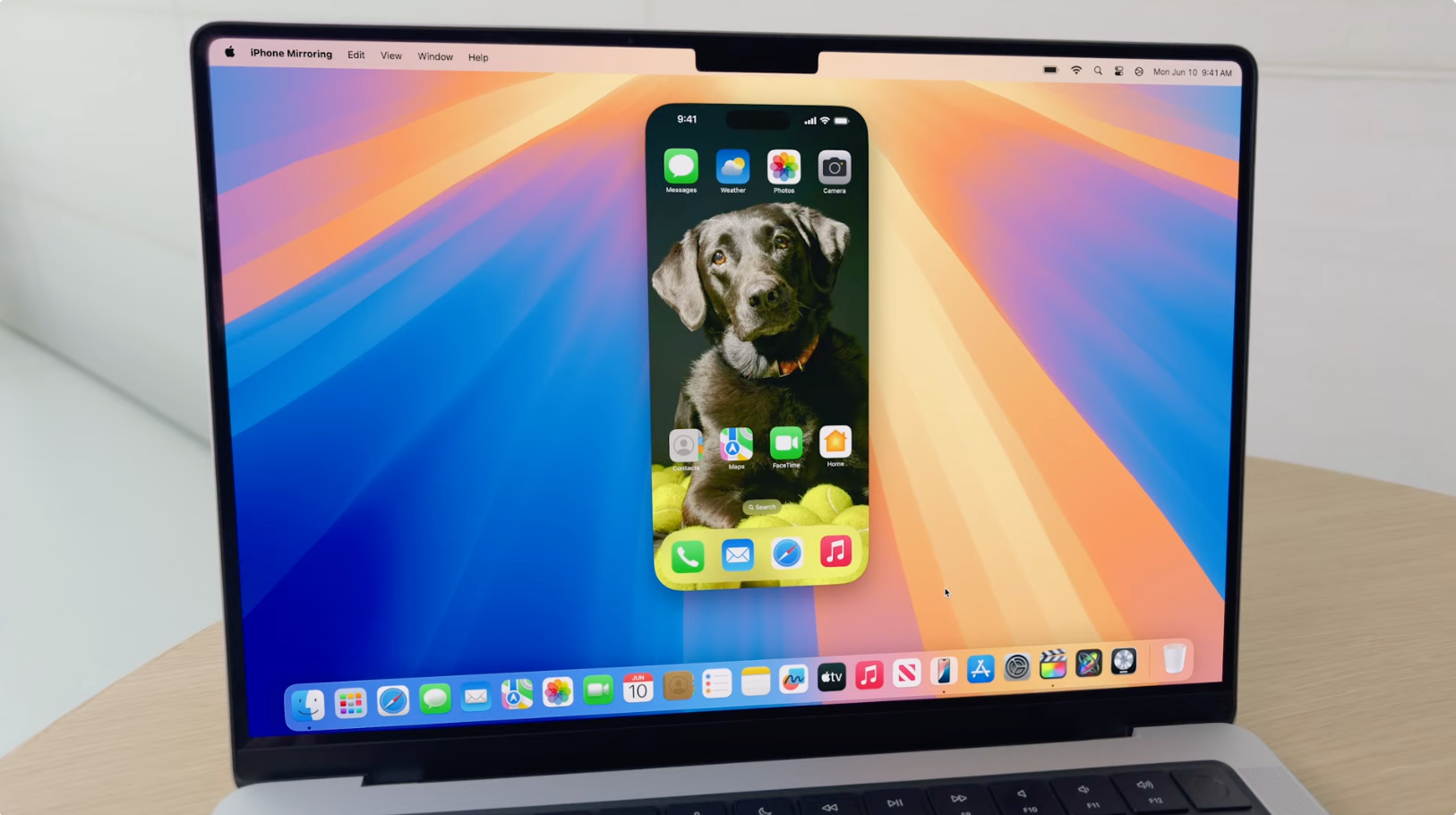
macOS Sequoia introduced several new features and improvements, mainly focused on productivity. Major highlights include:

  • iPhone Mirroring
  • Passwords (Password Manager)
  • Apple Intelligence (AI-driven functionality)

iPhone Mirroring showcased in macOS Sequoia

35

August 20, 2024

macOS 15.0 «Sequoia» Preview

macOS – Beta

Sequoia is the first version of macOS to drop support for Macs with the T2 chip.

It includes a number of new features and improvements, mainly focused on productivity: iPhone Mirroring, Passwords as a cross-platform password manager application, the second iteration of Game Porting Toolkit (GPTK), and following the AI hype by introducing the artificial intelligence feature «Apple Intelligence» to Apple silicon Macs.

34

September 26, 2023

macOS 14.0 «Sonoma»

macOS

Sonoma supports all Macs with Apple silicon, and drops support for various models released in 2017 – officially marking the end of support for Macs without Retina display and the 12-inch MacBook.

Alongside macOS Sonoma, Apple introduced developer tools for porting Windows games to macOS: the Game Porting Toolkit (GPTK), derived from Wine and released in beta, translates Windows application programming interface calls to equivalent macOS APIs, allowing developers to run unmodified versions of their x86 Windows DirectX games on macOS.

MacBook with Xbox game controller showcasing macOS Game Porting Toolkit

33

October 24, 2022

macOS 13.0 «Ventura»

macOS

macOS Ventura is the last version of macOS supporting several Macs, including the 21.5-inch 2017 iMac and the 12-inch MacBook.

Screenshot showing the macOS Ventura Desktop and Finder

32
31

November 12, 2020

macOS 11.0 «Big Sur»

macOS

Transition to Apple's ARM-based processors

This release was the first time the major version number of the macOS operating system had been incremented since the Mac OS X Public Beta in 2000. This change marks the transition to the first macOS version to support Macs with ARM-based processors.

For the first time, since OS X Yosemite 6 years earlier, it features a user interface redesign: new blurs to establish a visual hierarchy, along with making icons more square and UI elements more consistent. Other changes include a revamp of the Time Machine backup mechanism, and the control center from iOS 7.

macOS Big Sur is the final version of macOS that supports Macs with Nvidia graphics cards, specifically the 15-inch dual graphics late 2013 and mid 2014 MacBook Pro models, as its successor, macOS Monterey, drops support for those models.

Image source: https://dariusz.wieckiewicz.org/en/tag/apple-refurbished-store/

30

October 7, 2019

macOS 10.15 «Catalina»

macOS 10-series

Only 64-bit applications supported

This is the first version of macOS to support only 64-bit applications and the first to include Activation Lock. It is also the last version of macOS to have the major version number of «10»; as its successor, Big Sur, continues as version «11».

Catalina is the final version of macOS that supports the final Unibody MacBook Pro models, as its successor, macOS Big Sur, drops support those mid 2012 models.

Image source: https://news.softpedia.com/news/Apple-Welcomes-64-Bit-iOS7-Apps-on-iTunes-383576.shtml

29

September 24, 2018

macOS 10.14 «Mojave»

macOS 10-series

It's the final version of macOS to support 32-bit application software (through Rosetta translation layer), the last version of macOS capable of being booted from an HFS+ partition without third-party patching, and is also the last version of macOS to support the iPhoto app, which had already been superseded in OS X Yosemite (10.10) by the newer Photos app.

Feature-wise, this release brings several iOS apps to the desktop operating system: including Apple News, Voice Memos, and Home. It also includes a more comprehensive "dark mode".

Image source: https://9to5mac.com/2018/09/24/macos-mojave-top-features-changes-video/

28

September 25, 2017

macOS 10.13 «High Sierra»

macOS 10-series

macOS High Sierra is the last version of macOS to support the final models Unibody iMac and the Polycarbonate Unibody MacBook of the late 2009.

Image source: https://www.youtube.com/watch?v=7m57oX0Cc1s (Video Thumbnail)

27

September 20, 2016

macOS 10.12 «Sierra»

macOS 10-series

Naming transition from OS X to macOS

This release uses for the first time the operating system name «macOS», which stems from the intention to unify the system names with that of iOS, watchOS, and tvOS.

Sierra also introduced the Apple File System (APFS) to Macs, as a replacement of HFS+.

Image source: https://www.pcmag.com/news/10-things-you-need-to-know-about-macos-sierra

26

September 30, 2015

OS X 10.11 «El Capitan»

Mac OS X

25
24
23

July 25, 2012

Mac OS X 10.8 «Mountain Lion»

Mac OS X

22
21
20
19

January 10, 2006

Mac OS X 10.4.4

Mac OS X

Transition to Intel x86 processors

Upon the announcement at the 2005 WWDC to transition to Intel processors, the first-generation Intel-based Macs were released together with Mac OS X 10.4.4. making it the first Apple operating system to work on Apple–Intel architecture machines.

Image source: http://www.stevejobsmuseum.net/2012/01/2005-wwdc-2005-intelcpu.html

18

April 29, 2005

Mac OS X 10.4 «Tiger»

Mac OS X

Apple announced a transition to Intel x86 processors during Mac OS X 10.4 Tiger's lifetime.

Fun fact: the original Apple TV, released in March of 2007, shipped with a customized version of Mac OS X 10.4 Tiger branded "Apple TV OS" that replaced the usual GUI with an updated version of Front Row.

Image source: https://hiharbe.exblog.jp/27681991/

17
16
15
14

June 18, 2001

Mac OS 9.2

Classic Mac OS

End of the Classic Mac OS era

With this version, only Apple Macs with G3 processor as minimum system requirement were supported. Overall the OS improved overall speed and the Classic Environment support.

In May 2002 at Apple's Worldwide Developers Conference in San Jose, California, Steve Jobs, accompanied by a coffin, held a mock funeral to announce that Apple had stopped the development of Mac OS 9. The final version of Mac OS 9 and the "classic" Mac OS was Mac OS 9.2.2, released later that year on December 5, 2001.

Image source: https://www.versionmuseum.com/history-of/classic-mac-os

13

March 24, 2001

Mac OS X 10.0 «Cheetah»

Mac OS X

It was the first major release of Apple's Mac desktop and server operating system derived from NeXTSTEP and FeeBSD. It was released for a price of $129, after the public beta.

It featured a new user interface called Aqua, as well as improved stability and security due to its new Unix foundations. It also added the Quartz graphics rendering engine for hardware-accelerated animations, and ported many technologies from the classic Mac OS, including Sherlock and the QuickTime framework. The core components of Mac OS X were open sourced as Darwin.

Image source: https://www.versionmuseum.com/history-of/mac-os-x

12

September 13, 2000

Mac OS X Public Beta

Mac OS X

Transition to Mac OS X

This was the first publicly available version of Apple Computer's Mac OS X operating system to feature the Aqua user interface. It was released to the public for US$29.95 and was significant as the first publicly available evidence of Apple's ability to ship the "next-generation Mac operating system" after the Copland failure.

It allowed software developers and early adopters to test a preview of the upcoming operating system and develop software for it before its final release.

Image source: https://en.wikipedia.org/wiki/File:Macosxpb.png

11

October 23, 1999

Mac OS 9

Classic Mac OS

OS 9 was the last major revision of the Classic Mac OS in a generally steady evolution from Mac OS 8.

It added improved support for AirPort wireless networking, introduced an early implementation of multi-user support, improved Sherlock search engine, improved memory implementation and management, AppleScript to allow TCP/IP and networking control, and the first use of the centralized Apple Software Update to find and install OS and hardware updates. New features included its on-the-fly file encryption software with code signing and Keychain technologies, Remote Networking and File Server packages, and much improved list of USB drivers.

Image source: https://www.versionmuseum.com/history-of/classic-mac-os

10

October 17, 1998

Mac OS 8.5

Classic Mac OS

The first Apple Mac operating system version to run solely on a «PowerPC» processor, and it added built-in support for FireWire. It also added Sherlock and added support for the Power Macintosh G3.

Screenshot: https://archive.org/details/macos85_box

9

July 26, 1997

Mac OS 8

Classic Mac OS

Release the same month Steve Jobs became the de facto CEO of Apple. It was mainly released to keep the Mac OS moving forward during a difficult time for Apple: initially planned as Mac OS 7.7, it was renumbered «8» to exploit a legal loophole and accomplish Jobs's goal of terminating third-party manufacturers' licenses to System 7 and shutting down the Macintosh clone market.

It added a number of features from the abandoned Copland project, while leaving the underlying operating system unchanged: a multi-threaded Finder was included; files could now be copied in the background, the GUI was changed in appearance to a new shaded greyscale look named Platinum, and the ability to change the appearance themes («skins») was added with a new control panel.

Image source: https://www.versionmuseum.com/history-of/classic-mac-os

8

January 7, 1997

Mac OS 7.6

Classic Mac OS

With this version, the Apple Mac operating system was officially called «Mac OS» instead of «System». It was the last major update of the System 7-series and included new features like a revamped Extensions Manager, more native PowerPC code for Power Macs, more bundled Internet tools and utilities, and a more stable Finder with increased memory allocation.

Image source: https://siliconfeatures.com/mac-os-7-6/

7

May 13, 1991

System 7.0

Classic Mac OS

This was a major upgrade, adding a significant user interface overhaul, new applications, stability improvements and many new features. Its introduction coincides with the release of and provided support for the 68040 Macintosh computer line. The new era saw numerous changes in the Macintosh platform including a proliferation of Macintosh models, the 68k to «Power Macintosh» transition as well as the rise of Microsoft Windows, increasing use of computer networking and the explosion in the popularity of the Internet.

Image source: https://en.wikipedia.org/wiki/File:Mac_OS_7.6.1_emulated_inside_of_SheepShaver.png

6

April 1, 1988

System Software 6.0

Classic Mac OS

Also referred to as «System 6», is a consolidation release of the Macintosh system software producing a complete, stable, and long-lasting operating system. Two major hardware introductions under this system versions were the 68030 processor and 1.44 MB SuperDrive debuting with the «Macintosh IIx» and «Macintosh SE/30» computers.

Image source: https://www.versionmuseum.com/history-of/classic-mac-os

5

October 1, 1987

System Software 5.0

Classic Mac OS

For the first time, the Macintosh operating system was offered as a distinct retail product that included four 800K disks and three manuals, at a cost of US$49: Apple introduced this operating system as a package titled «Apple Macintosh System Software Update 5.0».

4
3
2

April 1, 1985

System Software 2.0

Classic Mac OS

Introduced "New Folder" and "Shut Down" commands, and installation of a "MiniFinder" application for quickly launching any of the chosen applications, and screenshots using ⌘ Command+⇧ Shift+3.

1
 Apple Mac Operating System Versions